Handy Hidden WordPress Hooks That Expert Developers Use in 2025
Last Updated: July 18, 2025


WordPress hooks form the backbone of plugin development, allowing you to modify data output and add functionality without touching the core files. When you understand how hooks work, you gain the ability to customize almost any aspect of WordPress behavior. There are two major types to master: Action Hooks for adding new functionality and Filter Hooks for manipulating data.
Did you know WordPress includes over 2,200 types of default hooks? Despite this abundance, many developers only scratch the surface of what’s possible with these powerful tools.
Learning to use hooks effectively comes in layers. You might already be familiar with common hooks like init – which fires after WordPress loads but before headers are sent – but expert developers go deeper. They harness hooks to schedule automated events, create plugin-to-plugin communication, and solve complex development challenges.
Ready to elevate your WordPress development skills? Let’s explore the hidden hooks that can transform your approach to customization and help you build more sophisticated, flexible solutions for your projects.

Beyond the commonly used WordPress hooks lies a world of powerful, lesser-known hooks that expert developers leverage to create advanced functionality. These hidden gems in the WordPress core offer precise control at critical moments during page execution.
The shutdown hook fires just before PHP terminates execution. What makes this hook particularly valuable is that it executes reliably even in scenarios where other hooks might fail, including fatal errors, Ajax requests, and when using exit; or die(); statements.
This reliability makes the shutdown hook perfect for “catch-all” logic that needs to run regardless of how a request terminates. As one developer noted:
                add_action(‘shutdown’, ‘my_shutdown_callback’);

function my_shutdown_callback() {

// Log errors, process queues, or clean up resources

}
Many developers use this hook for background processing tasks without slowing down the user experience. Since the shutdown hook runs after WordPress returns the request to the user, it essentially operates in the background after the page is rendered.
Some practical applications include:
Nevertheless, it’s important to note that if you call exit; inside your shutdown action handler, the request will immediately halt without calling other shutdown action handlers.
The template_redirect hook executes just before WordPress determines which template page to load. This strategic timing provides developers with full knowledge of the queried content, making it an ideal hook for implementing conditional redirects.
For instance, you might want to redirect users based on specific criteria:
                function custom_redirect_logic() {

if (is_page(‘members-only’) && !is_user_logged_in()) {

wp_redirect(home_url(‘/login/’));

exit();

}

}

add_action(‘template_redirect’, ‘custom_redirect_logic’);
One common mistake developers make with this hook is attempting to load a different template by including another template file and using exit(). This approach breaks subsequent hooks and can damage site functionality. Instead, the template_include filter is recommended for template modifications.
Additionally, WordPress documentation cautions about potential infinite redirect loops – always include a conditional check to prevent redirecting to the same page repeatedly.
The wp_loaded hook is fired once WordPress core, all plugins, and the theme are fully loaded and instantiated. This makes it an excellent choice for operations that need access to all WordPress components.
At this stage:
The wp_loaded hook runs on every page request – in both front-end and admin sections of the site, even for guest users. This universal execution makes it particularly useful for code that needs to run consistently across your entire site.
Though similar to the popular 'init' hook, wp_loaded occurs slightly later in the execution sequence. If you’re using multisite, wp_loaded happens after WordPress checks the status of the blog, which can be a must for certain operations.
Common use cases for wp_loaded include:
                add_action(‘wp_loaded’, ‘my_late_stage_function’);

function my_late_stage_function() {

    // Your code here will have access to all WordPress components

}
For developers working with AJAX, note that wp_loaded fires before the front-end and admin processes diverge, making it an important consideration for timing-sensitive operations.
Understanding these hidden core hooks gives you precise control over WordPress execution. Rather than relying solely on common hooks like ‘init’, expert developers strategically choose hooks that execute at exactly the right moment to accomplish specific tasks efficiently.
Plugin architecture in WordPress relies heavily on the hook system, specifically the add_action() function which connects custom code to WordPress events. Expert developers have refined approaches for implementing these hooks in ways that maximize both functionality and maintainability.
When building object-oriented plugins, you’ll often see hooks registered directly within class constructors. This approach offers organization benefits:
                class MyPlugin {

    function __construct() {

        add_action(‘init’, array($this, ‘getStuffDone’));

        add_action(‘admin_init’, array($this, ‘doAdminTest’));

    }
    function getStuffDone() {

        // Implementation code

    }
    function doAdminTest() {

        // Admin-specific code

    }

}
While this pattern works, several experts caution against it. Tommy McFarlin explains, “When an object is constructed it should simply be set in such a way that its attributes are set and its functions are ready to do work”. Placing hooks in constructors creates an immediate dependency on WordPress, which contradicts clean object design principles.
A more sophisticated approach involves separating hook registration from the constructor:
                class MyPlugin {

    function __construct() {

        // Only set up object properties here

    }
    function hooks() {

        add_action(‘init’, array($this, ‘getStuffDone’));

        add_action(‘admin_init’, array($this, ‘doAdminTest’));

    }

}
// Outside the class

$plugin = new MyPlugin();

add_action(‘plugins_loaded’, array($plugin, ‘hooks’));
This pattern improves testability as you can instantiate your class without automatically triggering WordPress-specific behavior. Moreover, moving hook registration outside the constructor prevents potential duplicated hooks if you create multiple class instances.
Anonymous functions (closures) provide a cleaner approach to hook registration without polluting the global namespace:
add_action(‘wp_head’, function() {
echo ‘
‘;
});
This technique offers several advantages. First of all, it keeps your codebase more organized by removing the need for separate named functions that might only be used once. Furthermore, closures can access variables from their parent scope using the use keyword:
$custom_color = get_option(‘my_theme_color’, ‘#333’);
add_action(‘wp_head’, function() use ($custom_color) {
echo ‘
‘;
});
However, anonymous functions come with notable limitations. As one Stack Overflow contributor points out, “You cannot remove the hook if needed” because remove_action() requires the function name as a parameter. Additionally, if your code needs to support PHP versions older than 5.3, anonymous functions won’t work at all.
For these reasons, use anonymous functions primarily for:
Hook priority determines the sequence in which callback functions execute when multiple functions are attached to the same hook. The priority parameter in add_action() accepts positive integers, with lower numbers executing earlier:
                add_action(‘init’, ‘run_first’, 5);

add_action(‘init’, ‘run_second’, 10); // 10 is default priority

add_action(‘init’, ‘run_third’, 15);
Carefully managing priorities ensures your code executes in the correct sequence. According to WordPress documentation, “If two callback functions are registered for the same hook with the same priority, they will be run in the order that they were registered to the hook”.
This becomes particularly important when:
Consider using standardized priority ranges for consistency:
Expert developers also recognize that priority management extends beyond numerical values – understanding the WordPress hook execution flow is equally important. Knowing exactly when hooks like plugins_loaded, init, and wp_loaded fire in relation to each other helps determine which hook to use for specific functionality.

One of WordPress’s most powerful yet underused features is the ability to create custom hooks that enable seamless communication between different plugins. This capability transforms isolated code into an ecosystem of interconnected components that can share data and functionality.
Custom action hooks allow other developers to extend your plugin without modifying its source code. To create a custom action hook, you use the do_action() function with a unique name:
do_action(‘my_plugin_after_process’);
This simple line creates an extension point where other plugins can hook in and execute their own code. For instance, if your plugin adds a settings form to the WordPress admin area, you might add:
                function my_plugin_settings_page() {

    // Settings field markup here
    // Create extension point at the end of the form

    do_action(‘my_plugin_after_settings_page_html’);

}
Now other developers can add their own settings to your form:
                add_action(‘my_plugin_after_settings_page_html’, ‘another_plugin_add_settings’);

function another_plugin_add_settings() {

    // Output additional settings fields

}
To avoid naming collisions, prefix your hook names with a unique identifier. A hook named simply email_body could easily conflict with another plugin, whereas myprefix_email_body is much safer. These collisions can lead to difficult-to-trace bugs when two developers use identical hook names for completely different purposes.
Custom hooks become significantly more useful when they pass data to callback functions. The do_action() function accepts unlimited additional arguments after the hook name:
do_action(‘my_plugin_user_registered’, $user_id, $user_data);
Subsequently, any function hooked to this action can access these parameters:
                function send_welcome_email($user_id, $user_data) {

    // Process the user data and send email

}

add_action(‘my_plugin_user_registered’, ‘send_welcome_email’, 10, 2);
Notice the 10, 2 at the end of add_action(). The first number (10) represents priority, while the second (2) indicates how many parameters the callback function accepts. Without specifying this number, only the first parameter would be passed to your function.
As a result, you can create sophisticated workflows where multiple plugins respond to the same event with full access to relevant data. This approach maintains clean separation between plugins while enabling them to work together effectively.
While do_action() lets other code execute at certain points, apply_filters() goes further by allowing external code to modify values in your plugin. The function takes at least two parameters: the filter name and the value to be filtered.
                $post_type_params = [

    ‘public’ => true,

    ‘hierarchical’ => false,

    // Other parameters

];
// Allow other plugins to modify these parameters

$filtered_params = apply_filters(‘my_plugin_post_type_params’, $post_type_params);
// Use the potentially modified parameters

register_post_type(‘my_custom_post_type’, $filtered_params);
With this pattern, another plugin can modify your post type’s behavior without direct modification:
                function make_post_type_hierarchical($post_type_params) {

    // Make this post type hierarchical

    $post_type_params[‘hierarchical’] = true;

    return $post_type_params;

}

add_filter(‘my_plugin_post_type_params’, ‘make_post_type_hierarchical’);
The key difference from actions is that filters must always return a value—specifically, the modified version of what was passed in. This requirement ensures that the data flows correctly through your application.
To clarify, filters typically work with data that’s about to be used, displayed, or stored—giving other code a chance to transform it first. This approach to extensibility has been fundamental to WordPress’s success as a platform, allowing seamless integration between components built by different developers.

The WordPress hook system underwent a significant overhaul in version 4.7 with the introduction of the WP_Hook class, creating a more robust architecture for plugin and theme development. This change addressed several critical issues while maintaining backward compatibility for existing code.
At its core, the WP_Hook class serves as the foundation for WordPress’s action and filter functionality. Prior to WordPress 4.7, hook management relied on a complex array structure inside the $wp_filter global variable. Currently, this global contains an array of WP_Hook objects that implement the ArrayAccess interface to maintain compatibility with older code.
The class includes several key methods that power the hook system:
add_filter(): Registers a callback function with a hookapply_filters(): Executes filter callbacks and returns the modified valuedo_action(): Executes action callbacksremove_filter(): Removes a previously registered callbackhas_filter(): Checks if a callback existsWhat makes this class particularly powerful is how it manages hook callbacks internally. Each WP_Hook object maintains its own $callbacks property, organizing them by priority levels. This structure enables WordPress to efficiently handle execution order while preventing issues that plagued the previous implementation.
A notable feature is the class’s handling of recursive callbacks. The WP_Hook class tracks the current iteration state, preventing potential infinite loops when a hook callback adds or removes other callbacks to the same hook during execution.
The lifecycle of a WordPress hook follows a predictable path through the system. Initially, when your plugin or theme registers a hook using add_action() or add_filter(), WordPress doesn’t immediately execute anything. These functions simply store your callbacks in the appropriate WP_Hook object inside the $wp_filter global.
During registration, WordPress performs several critical tasks:
Subsequently, when WordPress reaches a do_action() or apply_filters() call in the code, the execution phase begins. The system looks up the corresponding WP_Hook object and processes all registered callbacks in priority order. For identical priorities, callbacks execute in the order they were registered.
The execution process handles several edge cases gracefully. For instance, if a callback adds or removes other callbacks during execution, the WP_Hook class maintains a record of the “current state” to ensure consistent behavior. This feature, primarily, addresses bugs that plagued the previous implementation where recursive callbacks could cause unpredictable results.
Strategic hook placement significantly impacts performance and maintainability. For plugin developers, the question often arises: should hook registrations be placed directly after function definitions or grouped elsewhere?
The most direct approach places hook registrations immediately after their callback function definitions:
                function my_callback_function() {

    // Function logic here

}

add_action(‘init’, ‘my_callback_function’);
This pattern works well for simpler plugins but can become unwieldy as complexity increases. For object-oriented plugins, there are two common approaches:
                class MyPlugin {

    public function __construct() {

        add_action(‘init’, array($this, ‘initialize’));

    }
    public function initialize() {

        // Method logic

    }

}
                class MyPlugin {

    public function __construct() {

        // Only property initialization

    }
    public function register_hooks() {

        add_action(‘init’, array($this, ‘initialize’));

    }

}

$plugin = new MyPlugin();

$plugin->register_hooks();
Notably, certain hooks require special consideration for placement. The register_activation_hook() function must be called from your main plugin file and cannot be registered from within another hook. As WordPress documentation states: “Note that register_activation_hook must not be registered from within another hook… as these will have been called before the plugin is loaded or activated.”
Overall, hook placement should prioritize code organization and maintainability while considering the WordPress execution sequence. Understanding the hook lifecycle enables you to place your code at precisely the right moment in the execution flow, creating more efficient and reliable WordPress extensions.

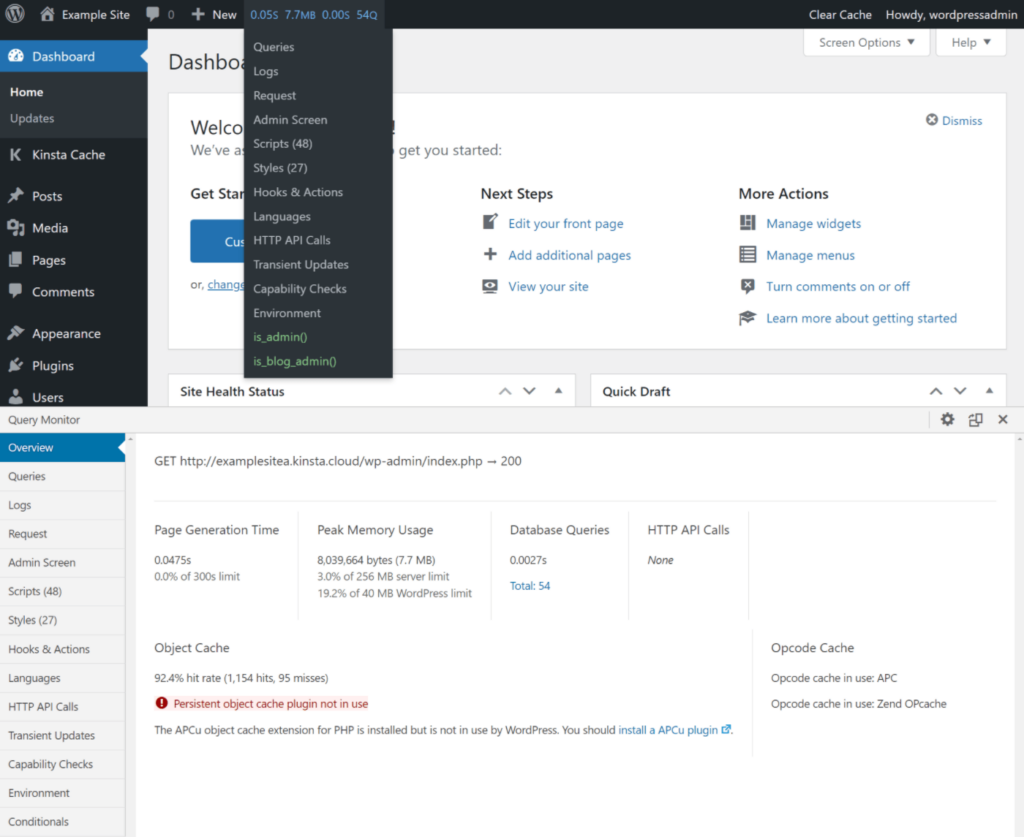
Image Source: Kinsta
Tracing hooks through WordPress’s execution flow requires specialized methods that expert developers rely on. As your plugins grow in complexity, understanding what’s happening behind the scenes becomes increasingly important for troubleshooting and optimization.
Query Monitor stands out as an essential debugging plugin that provides comprehensive insight into WordPress hooks and actions. This developer-focused tool adds an admin toolbar menu showing an overview of the current page load, with detailed debugging information displayed in panels once you select a menu item.
For hook debugging specifically, Query Monitor offers a dedicated “Hooks & Actions” panel that displays:
In addition, you can view hooks with either filters or actions used by the current page by examining the “Hooks in Use” sub-panel. Clicking the blue “+” button beside any callback reveals the exact file path and line number where the function is located, eliminating guesswork when tracking down implementation details.
Furthermore, Query Monitor enables developers to profile running time and memory usage through special actions:
                // Start timing a specific process

do_action(‘qm/start’, ‘my_process’);
// Run your potentially slow code

my_complex_function();
// Stop timing and record results

do_action(‘qm/stop’, ‘my_process’);
For deeper inspection, you can access the global $wp_filter variable directly. This variable contains all registered hooks as an array of WP_Hook objects, providing raw access to WordPress’s hook system:
function list_hooks($hook_name = ”) {
global $wp_filter;
if ($hook_name && isset($wp_filter[$hook_name])) {
// Show details for a specific hook
echo “
";
print_r($wp_filter[$hook_name]);
echo "“;
} else {
// List all hook names
echo “
";
print_r(array_keys($wp_filter));
echo "“;
}
}
The structure of $wp_filter includes priority levels and all registered callback functions. After examining the output, you’ll see hooks organized by priority with detailed information about each callback function, including:
Hook conflicts typically occur when multiple plugins attempt to modify the same WordPress behavior. These issues often manifest as visual glitches, functional errors, or unexpected behavior.
To systematically identify hook conflicts:
First, enable WordPress debugging by adding these lines to your wp-config.php file:
                define(‘WP_DEBUG’, true);

define(‘WP_DEBUG_LOG’, true);

define(‘WP_DEBUG_DISPLAY’, false);
Consequently, errors will be logged to the debug.log file in your wp-content directory.
When set to true, the log is saved to debug.log in the content directory (usually wp-content/debug.log) within your site’s file system. Alternatively, you can set it to a valid file path to have the file saved elsewhere.
To isolate plugin conflicts, deactivate all plugins, then reactivate them one by one until the issue reappears. Once you’ve identified the conflicting plugins, you can examine their hook usage through Query Monitor or the $wp_filter global.
Priority issues often arise when callbacks must execute in a specific order. In such cases, adjust the priority parameter in add_action() or add_filter() calls – lower numbers execute earlier, enabling you to control execution sequence precisely.
                // This runs earlier (priority 5)

add_action(‘init’, ‘my_critical_function’, 5);
// This runs at default priority (10)

add_action(‘init’, ‘standard_function’);
// This runs later (priority 20)

add_action(‘init’, ‘cleanup_function’, 20);
While WordPress hooks offer remarkable flexibility, they face significant scalability challenges in enterprise-level applications. As projects grow in complexity, these limitations become increasingly apparent to development teams.
The WordPress hook system originated before PHP had namespace support, creating inherent structural constraints. Consequently, developers often resort to function name prefixing to avoid collisions. What starts as get_recent_posts() evolves into myplugin_get_recent_posts() and eventually vendor_plugin_get_recent_posts() – making code progressively harder to read and maintain.
This prefixing strategy represents a “pseudo-namespace” approach that merely works around the fundamental issue. Even with modern PHP namespaces, hooking namespaced functions creates unexpected complications:
                namespace MyPlugin;

// This won’t work as expected

add_action(‘admin_menu’, ‘function_name’);
// This is required instead

add_action(‘admin_menu’, __NAMESPACE__ . ‘\function_name’);
Such namespace inconsistencies across WordPress can lead to confusing errors like “The plugin generated unexpected output during activation” when attempting to use standard PHP practices.
Tracking hook execution in complex WordPress projects resembles following threads through a labyrinth. Each investigation typically spirals into what one developer describes as a “black hole” – examining one hook leads to discovering multiple unfamiliar functions, each demanding further research.
Unlike traditional programming paradigms, WordPress’s event-driven architecture allows any component to modify system state by responding to hooks, creating a debugging nightmare. As one expert notes, “event-driven systems are very difficult to debug” precisely because they don’t reveal their full behavior until complete execution.
The dynamic nature of hooks compounds this problem – functions can be added and removed repeatedly throughout execution, making their current state unreliable for debugging purposes. This behavior particularly affects large-scale sites handling millions of monthly pageviews, where minor oversights in hook implementation can cause persistent stability issues.
Professional debugging therefore requires specialized tools like Query Monitor or custom profiling solutions that can trace execution times and hook sequences through the WordPress execution lifecycle.

WordPress hooks are connection points that allow developers to add or modify functionality without changing core files. They are important for extending WordPress, enabling plugin and theme developers to create customizable and flexible solutions.
The 'shutdown' hook is ideal for tasks that need to run after page content is sent to the browser. It’s perfect for logging, cleanup operations, or background processing that doesn’t need to delay page load times for users.
Action hooks allow you to add new functionality at specific points in WordPress execution, while filter hooks let you modify existing data before it’s used or displayed. Both are essential for customizing WordPress behavior.
You can create custom hooks using do_action() for actions and apply_filters() for filters. This allows other plugins to interact with your code, enhancing extensibility and enabling seamless integration between different WordPress components.
Query Monitor is a powerful plugin for tracing hook execution and debugging. Additionally, you can use the global $wp_filter variable to inspect registered hooks directly. These tools help identify conflicts, priority issues, and overall hook behavior in your WordPress setup.
WordPress hooks truly represent the backbone of extensibility that powers the entire ecosystem. Throughout this exploration of hidden hooks, you’ve gained insights into powerful tools that remain underutilized by most developers. Expert WordPress developers distinguish themselves primarily through their deep understanding of these hooks and their strategic implementation.
Additionally, mastering hooks like ‘shutdown’, ‘template_redirect’, and ‘wp_loaded’ gives you precise control over WordPress execution at critical moments. This knowledge certainly transforms your approach from simply writing functional code to orchestrating sophisticated interactions within the WordPress core.
The most effective WordPress developers, undoubtedly, think beyond individual hook implementation. They create comprehensive systems where custom hooks enable seamless plugin-to-plugin communication. This approach essentially turns isolated components into interconnected ecosystems that share data and functionality while maintaining clean separation.
Nevertheless, WordPress hooks do present challenges, especially in large-scale projects. Namespace pollution and debugging complexity can make hook management increasingly difficult as projects grow. Despite these limitations, the benefits of mastering hooks significantly outweigh the challenges when implemented thoughtfully.
As you continue your WordPress development journey, remember that hooks represent more than just technical connection points – they embody the collaborative philosophy that makes WordPress endlessly customizable. Your growing expertise with these powerful tools will help you build more sophisticated, flexible, and maintainable WordPress solutions for years to come.
Do you like this article? Share it and send us your feedback! Check out our articles page, where you might find other interesting posts. Also, if you want to learn more about business, check out the WPRiders Blog!


